Spark HistoryServer Intros and Troubleshooting
HistoryServer Introduction
HistoryServer is an HTTP service built into Spark, we can start it with the following code. When HistoryServer is started, it starts two threads to parse and clean the log files.
1 | |
This creates a web interface at http://<server-url>:8080, listing incomplete and completed applications and attempts.
The spark jobs themselves must be configured to log events, and to log them to the same shared, writable directory.
For example, if the server was configured with a log directory of hdfs://namenode/spark-logs, then the client-side options would be:
1 | |
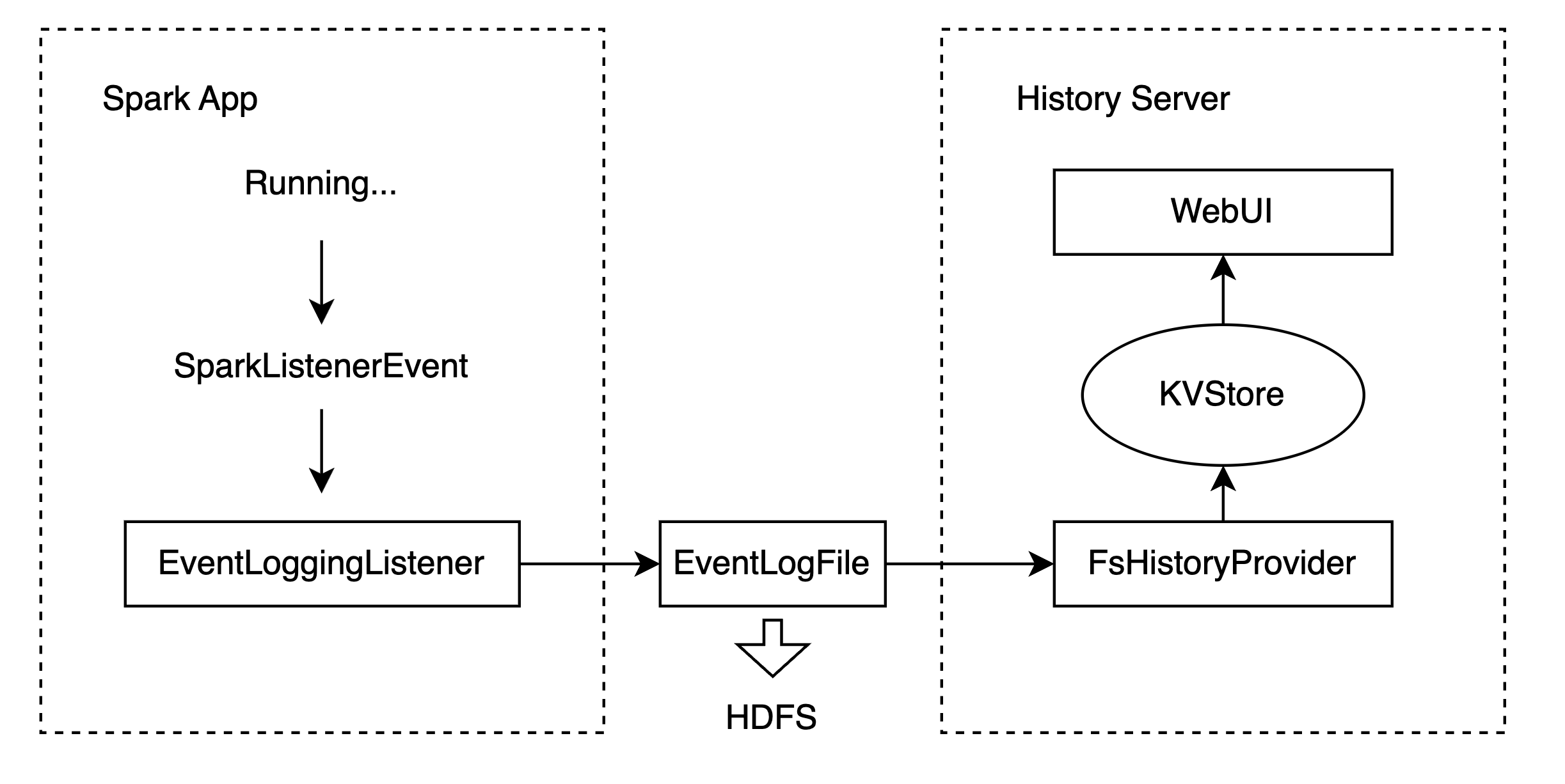
To introduce the Spark History Server, the flowchart below outlines its workflow.
The Spark History Server relies on the Spark Event system. During a Spark task, various SparkListenerEvents are generated, like ApplicationStart and StageCompleted. These events are sent to the ListenerBus, where they are monitored by registered listeners. The EventLoggingListener writes these events to a JSON log file on a file system like HDFS.
The FsHistoryProvider in the History Server scans the log storage path periodically, extracts profile information (such as Application_id, user, status, start_time, end_time, event_log_path) from the log files, and maintains a list of this data. When a user accesses the UI, the system searches this list for the requested task and reads the corresponding event log file for details if it exists.
Issue
In some cases, after submitting a job using Spark, the log information corresponding to the appId cannot be found in the Spark HistoryServer WebUI (v3.2.1).
As a result, users cannot analyze the job log through the HistoryServer (HS). Upon analyzing the source code, it was found that the issue is due to the misuse of a data structure in a multithreading context.
Data Structure
Before explaining the problem, it’s important to understand the key data structure in HS. The misuse of this data structure causes the issue. HS uses a data structure called Listing to store key-value pairs, such as:
1 | |
Log Parsing Process
The HS runs the checkForLogs method every 10 seconds by default to build the application list based on the current contents of the log directory. During each execution, this method scans the specified logDir and parses the log files to update its KVStore listing. The process includes two main methods:
- update/add log file records respectively
- remove stale log file records.
These methods are executed in different threads via submitLogProcessTask.
Issue Scenario
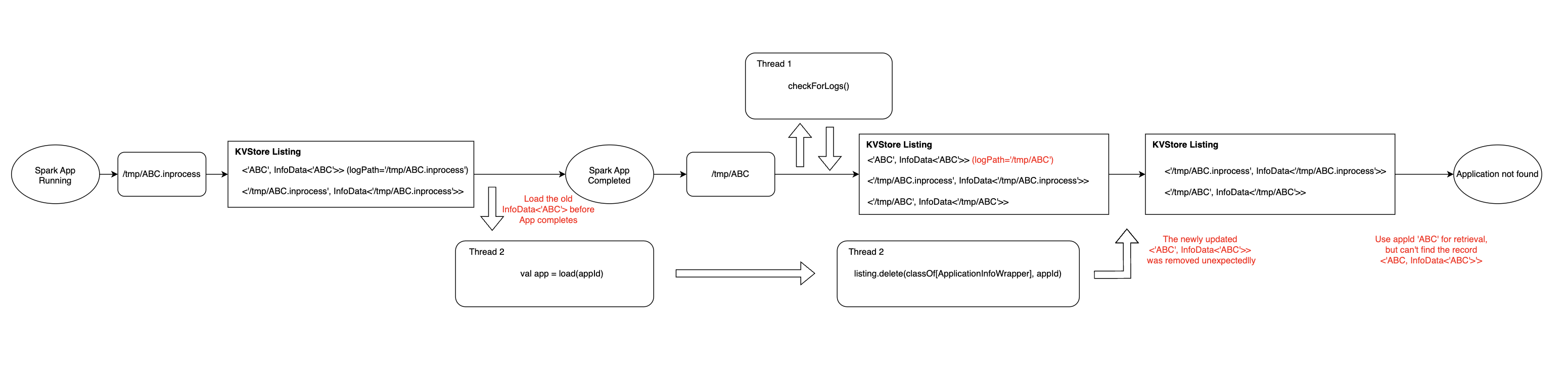
When checkForLogs is executed for the first time, the ABC job submitted by the user is still running. The file name in the log directory is ABC.inprocess, so the KVStore Listing adds two new entries:
1 | |
In the next run of checkForLogs, now the ABC application has finished, the log file /tmp/ABC.inprocess has been deleted, and the new log file path is /tmp/ABC, so in this run of checkForLogs, two threads will start and do following things:
Thread 1: update/add log file records, this thread will parsing the log path /tmp/ABC. First it will update the <'ABC', InfoData<'ABC'>> in the KVstore Listing, second it will add a new record <'/tmp/ABC', InfoData<'/tmp/ABC'>> in KVstore Listing.
Thread 2: remove stale log file records, this thread will notice that the log path /tmp/ABC.inprocess has disappeared. First it will filter this path as a stale data, second it will start cleanAppData method, in this method the following code will be executed:
1 | |
Usually, by the time this method loads the appId, Thread 1 has already updated <'ABC', InfoData<'ABC'>> in the KVStore Listing. Therefore, when the following code executes, the value of isStale will be false.
1 | |
However, in some cases, when this method loads the appId, Thread 1 has not finished the update. As a result, when the code above executes, the value of isStale will be true. The worst outcome is that it will delete the log file record <'ABC', InfoData<'ABC'>> in the KVStore Listing after Thread 1 has completed the update.
1 | |
So, the log file record <'ABC', InfoData<'ABC'>> will be permanently removed. When users access the WebUI for this application, they will see “Application not found” even though the log file for the app still exists.
One thing to note is that the log file record <'ABC', InfoData<'ABC'>> will not be added to the KVStore Listing again. In the next run of checkForLogs, the entry <'/tmp/ABC', InfoData<'/tmp/ABC'>> indicates that the log file of ABC does not need to be reloaded, so the method will skip this log file.
1 | |
To better show the process of bug occurrence, below is the flowchart
Solution
Due to multi-thread error common use of KVstore Listing, we make the cleanAppData method atomic, just like the addListing mothod, this allows threads to use KVstore Listing without data errors.
For example:
If Thread 1 gets the lock on the KVstore Listing before Thread 2, it will update the record of <appId, InfoData<appId>>, so Thread 2 can safely get the record and it will make isStale be false, so the cleanAppData method will not delete the record in KVstore Listing.
If Thread 2 gets the lock on the KVstore Listing before Thread 1, it will make isStale be true, and the cleanAppData method will delete the record in KVstore Listing. But it will be ok, beacuse Thread 1 will add the record of <appId, InfoData<appId>> in KVstore Listing again.
In all situations above, the record of KVstore Listing will not remove unexpectedly.
This is the method used to fix the problem in Spark v3.2.2 (https://github.com/apache/spark/pull/36424/files).